
Python Data Lineage (Gudu SQLFlow Lite version for python)
Python data lineage package (aka Gudu SQLFlow Lite version for python) is a tool set used to analyze SQL statements and stored procedures of various databases to obtain complex data lineage relationships and visualize them.
Gudu SQLFlow Lite version for python allows Python developers to quickly integrate data lineage analysis and visualization capabilities into their own Python applications. It can also be used in daily work by data scientists to quickly discover data lineage from complex SQL scripts that usually used in ETL jobs do the data transform in a huge data platform.
Gudu SQLFlow Lite version for python is free for non-commercial use and can handle any complex SQL statements with a length of up to 10k, including support for stored procedures. It supports SQL dialect from more than 20 major database vendors such as Oracle, DB2, Snowflake, Redshift, Postgres and so on.
Gudu SQLFlow Lite version for python includes a Java library for analyzing complex SQL statements and stored procedures to retrieve data lineage relationships, a Python file that utilizes jpype to call the APIs in the Java library, and a JavaScript library for visualizing data lineage relationships.
Gudu SQLFlow Lite version for python can also automatically extract table and column constraints, as well as relationships between tables and fields, from DDL scripts exported from the database and generate an ER Diagram.
Automatically visualize data lineage
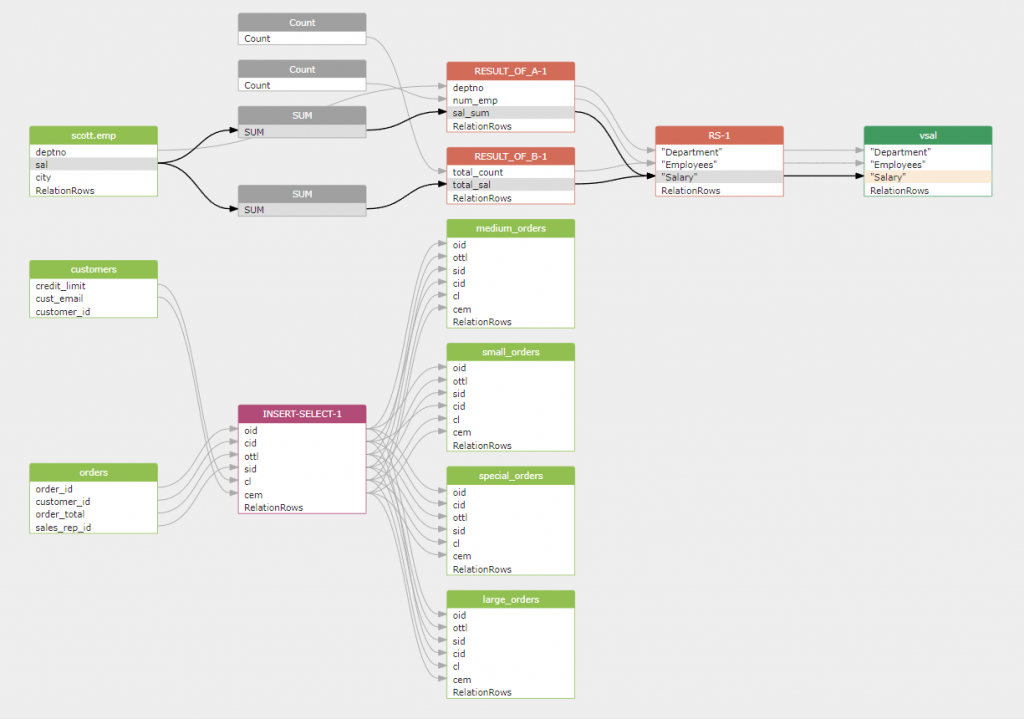
python dlineage.py /t oracle /f test.sql /graphWe can automatically obtain the data lineage relationships contained in the following Oracle SQL statement.
CREATE VIEW vsal
AS
  SELECT a.deptno                  "Department",
         a.num_emp / b.total_count "Employees",
         a.sal_sum / b.total_sal   "Salary"
  FROM   (SELECT deptno,
                 Count()  num_emp,
                 SUM(sal) sal_sum
          FROM   scott.emp
          WHERE  city = 'NYC'
          GROUP  BY deptno) a,
         (SELECT Count()  total_count,
                 SUM(sal) total_sal
          FROM   scott.emp
          WHERE  city = 'NYC') b
;

INSERT ALL
	WHEN ottl < 100000 THEN
		INTO small_orders
			VALUES(oid, ottl, sid, cid)
	WHEN ottl > 100000 and ottl < 200000 THEN
		INTO medium_orders
			VALUES(oid, ottl, sid, cid)
	WHEN ottl > 200000 THEN
		into large_orders
			VALUES(oid, ottl, sid, cid)
	WHEN ottl > 290000 THEN
		INTO special_orders
SELECT o.order_id oid, o.customer_id cid, o.order_total ottl,
o.sales_rep_id sid, c.credit_limit cl, c.cust_email cem
FROM orders o, customers c
WHERE o.customer_id = c.customer_id;
And visualize it as:
Python data lineage package features:
- Generate interactive data lineage visualizations
- Create data lineage in JSON/CSV/GRAPHML
- Support SQL from more than 20 major database vendors
How python data lineage tool works
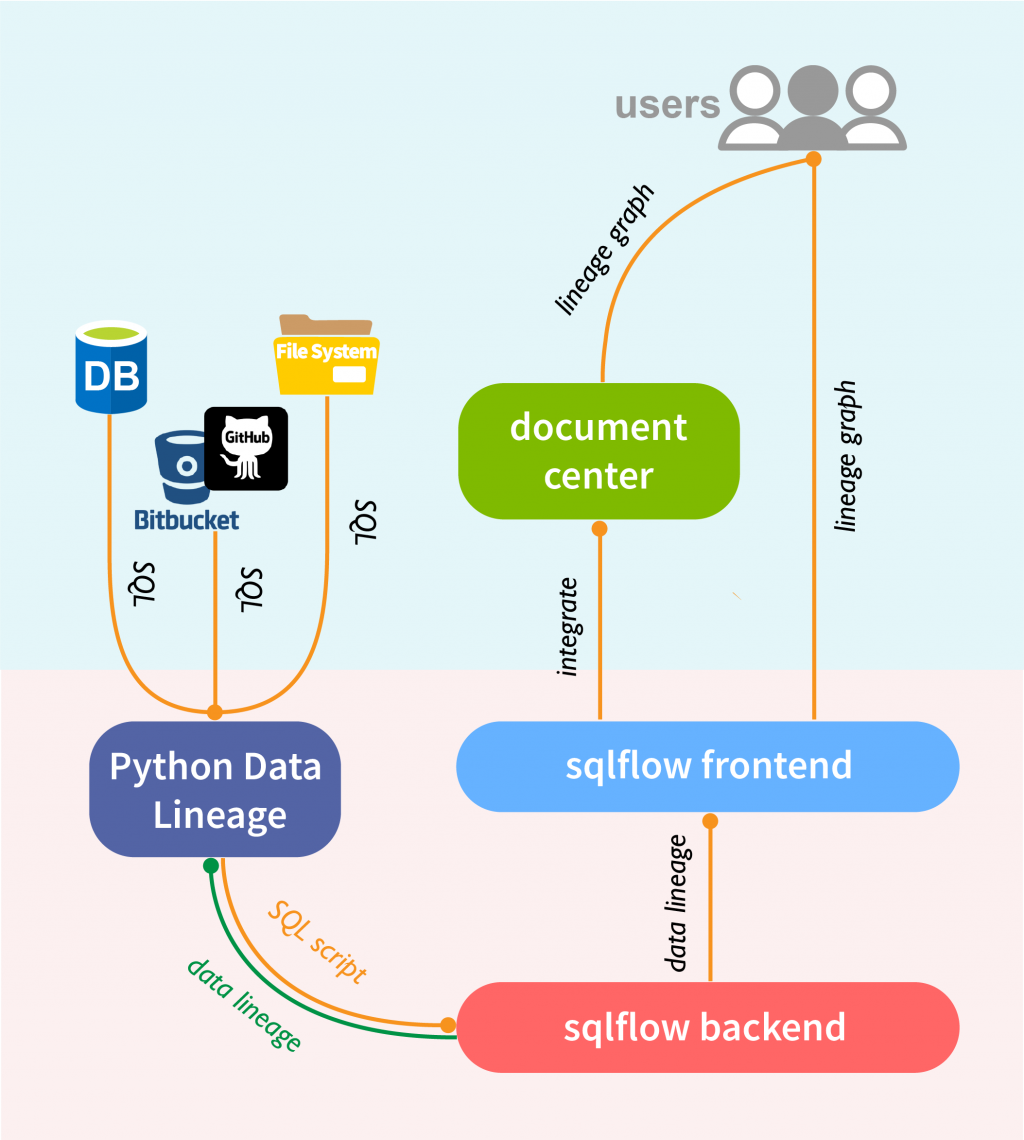
Now, all the above components are packaged into a single repository on github and you get it for free by simply clone it.
git clone https://github.com/sqlparser/python_data_lineage.git– No database connection is needed.
– No internet connection is needed.
You only need a JDK and a python interpreter to run this python data lineage package locally.